Tuesday, August 29, 2017

Building pbrt-v3 in VS 2015, other notes

I thought I'd write other things I found interesting while writing in my blog about how I built pbrt-v3. Again, I hardly know anything about pbrt itself or Cmake, but I still I thought it'd be cool to share what I found about them (and the whole process in general, too).

-Two major things I put here:
  -Debug vs. Release build of pbrt
  -Possible minor bug fix with PBRT_FLOAT_AS_DOUBLE

-The pbrt authors included a Users' Guide in their site. They also provide info. about their Input File Format (probably about the .pbrt files like "teapot-metal.pbrt".

-Biggest thing to note: from the pbrt site, pbrt in "Debug mode" is understandably very slow compared to "Release mode". For "Release mode" and the faster render times, during CMake usage, the option CMAKE_BUILD_TYPE is automatically set to "Release".

But you can still build the VS solution in Debug mode, and the corresponding pbrt.exe outputs the banner *** DEBUG BUILD *** when you run it, to notify you of slow rendering times for debugging purposes. So make sure to also build the solution in Release mode if you just want to render.

Again, the differences are massive. I only found this out today, as I'm writing this! haha. I didn't really read the banner, I was just focused on getting something to work when I first did this.

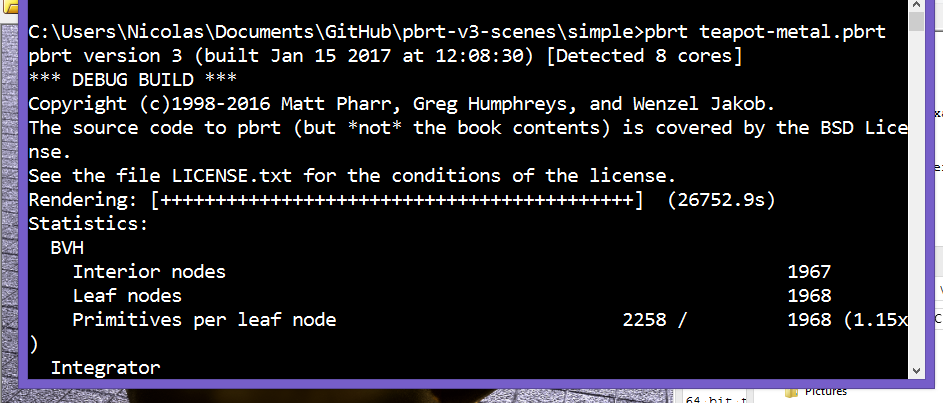
Here's two images showing how different the rendering times are:

Debug build (also my first successful pbrt render back in January!): 26572.9s = 7.4 hrs


Release build: 880.5s = 14.675 min (30x faster!)


-Possible minor bug fix:

EDIT: got a confirmation from one of the pbrt authors! : ) was a bug. better solution than pointer casting is to actually create a local Float[] array where you can pass in float elements that can be implicitly converted to double elements, see highlighted edit below

(Basically, found if you #define PBRT_FLOAT_AS_DOUBLE, get an error in ptex.cpp, line 130 in VS 2015 saying can't convert a "float*" to "const pbrt::Float[]", which now is "const double[]", explicitly casting the result variable in that line to "const pbrt::Float*" worked for me)

The pbrt site says you can uncomment the //#define PBRT_FLOAT_AS_DOUBLE line in the src/core/pbrt.h file that's in the pbrt repo you can check out. You can do this even if you already have a pbrt VS solution made, since it's just a .h file you're editing.

When I built on Release - x64, however, I got these errors:

C2664 'pbrt::RGBSpectrum pbrt::RGBSpectrum::FromRGB(const pbrt::Float [],pbrt::SpectrumType)': cannot convert argument 1 from 'float *' to 'const pbrt::Float[]'

argument of type "float *" is incompatible with parameter of type "const pbrt::Float"


This is in a file called ptex.cpp, in line 130, in the pbrt project. From looking at the project properties, the pbrt project is supposed to make some "libpbrt.lib" library. With this error, the .lib file isn't made, which caused errors about not being able to open that .lib file.


The function definition containing line 130 is:

template <>
inline Spectrum fromResult<Spectrum>(int nc, float *result) {
if (nc == 1)
return Spectrum(result[0]);
else
return Spectrum::FromRGB(result);
}

Wasn't familiar with the "template <>" or "inline" keywords at the time, but saw with VS that Spectrum::FromRGB takes a "const pbrt::Float *" as its first argument. Looking back at the pbrt.h file, turning on PBRT_FLOAT_AS_DOUBLE changes the Float typedef from a float to a double (also, the pbrt.h defines this in a pbrt namespace [hence pbrt::Float]):

#define PBRT_FLOAT_AS_DOUBLE
#ifdef PBRT_FLOAT_AS_DOUBLE
typedef double Float;
#else
typedef float Float;
#endif  // PBRT_FLOAT_AS_DOUBLE

So going back to that code snippet, since "const pbrt::Float*" pretty much meants "const double *", passing "result" tries to implicitly convert a float* to a double*, and apparently that's an error in VS 2015 (not sure if that's universal).

So I put an explicit cast like below, built the solution again, and it worked.

return Spectrum::FromRGB((const pbrt::Float*)result);

I wrote about the bug fix I did in the Github issue tracker for the pbrt repo. It's minor compared to the entire scope of pbrt itself, but I thought it could help. Interestingly, I looked back at the pbrt solution I made back in January, and didn't find a ptex.cpp file there. Looks like this is relatively new. May be related to some texture cache feature they implemented back in March, according to their site news.

Edit  Got a confirmation that this line was a bug. One of the pbrt authors pushed a fix today

template <>
inline Spectrum fromResult<Spectrum>(int nc, float *result) {
if (nc == 1)
return Spectrum(result[0]);
else {
Float rgb[3] = { result[0], result[1], result[2] };
return Spectrum::FromRGB(rgb);
}

}


This is a better solution, to actually pass a pbrt::Float[] into Spectrum::FromRGB by creating a local Float array variable called "rgb". (I assume the size is 3 just because "rgb" is 3 values.) Looks like since it's assured that the array pointed to by "result" is size 3, can initialize the "rgb" by passing in float values pointed to by the "result" array. The values are then implicitly converted to double values since Float is of type double due to the PBRT_FLOAT_AS_DOUBLE define, and then the array is good to go to be passed into the "FromRGB" function.

Cleaner and makes more sense than converting a float* to a double*, but still, happy I got some sort of bug fix working. Pretty cool, this would be the first bug I ever found in source code as big as this. Minor bug, but still, big self-achievement for me! : )

-The pbrt site says it supports pfm, exr, tga, png file formats (where pfm and exr are more "accurate" file formats because they can store floats for what I think are color values). In the "teapot-metal.pbrt" file, in line 9 (doing this from Notepad++), you can change "teapot-metal.exr" to "teapot-metal.png" if you just want to see the image in a program like IrfanView immediately.


The pbrt-v3-scenes folder contains already made .exr files at pbrt-v3-scenes/images. A teapot-metal.exr is available in the "simple" folder.


-If you try to "Download ZIP" at the pbrt repo site or try to do clone the repo w/o the --recursive flag, you'll get an error in CMake GUI about the flag.


-When running "pbrt teapot-metal.pbrt" in cmd, teapot-metal.pbrt references other files. If it doesn't find them, it shows a warning, like below. The .pbrt file uses custom-made text inputs, from what I'm seeing. They include references to other files.


Building pbrt-v3 in VS 2015, rendering a metal teapot

Finding Physically Based Rendering: From Theory to Implementation at my university last August and then figuring out this January how to build pbrt-v3 and use cmake for the first time was really exciting for me. Hardly knew anything about them then (and now too haha), but would like to look more into raytracing with this in the future.

For now, I'd like to share the bare steps I took to get pbrt-v3 built in VS 2015 in 64-bit and to render a "teapot-metal.pbrt" sample. Again, I know close to nothing about pbrt and little about cmake, but I still think it'd be cool to share the steps I found to get something rendered here, for people interested in computer graphics at this level.

EDIT: Important to note is that Debug build of pbrt for debugging purposes runs way slower than Release build. Also, possible minor bug fix with PBRT_FLOAT_AS_DOUBLE. Made general other notes about pbrt in a blog post here

(Using Windows 8.1, Visual Studio 2015, and CMake 3.7.2. For git, I just got it working by installing Github Desktop for Windows)

1. Open cmd. Switch to a folder where you want the pbrt-v3 source code folder to be cloned into.

2. Type "git clone --recursive https://github.com/mmp/pbrt-v3/.
  -Cloning will take a while. A folder named "pbrt-v3" will appear when done.

3. Open CMake GUI.
  -For "Where is the source code", click "Browse Source", and select the "pbrt-v3" folder.
  -For "Where to build the binaries", select an empty folder. I made a folder called "pbrt_build".

4. Click "Configure". In "Specify the generator for this project", Select "Visual Studio 14 2015 Win64" (this will make a VS 2015 solution that only has a 64-bit build option). Click Finish.

5. CMake will do configuration processing. When it's finished, it'll show values in red. Click "Configure" again to confirm the configuration.

6. Click "Generate" to actually create a VS 2015 solution. Then click "Open Project" to open the solution.

7. VS 2015 will probably do some initial processing. When it's done, click "Build -> Build Solution".
  -The configuration I'm building in is Debug - x64.

8. With a successful build, you'll get a "pbrt.exe" to use. I'd say check it out at this point, for curiosity.

  -To check out the build, open your solution directory (you can right-click "Solution 'PBRT-V3' (40 projects)" in the Solution Explorer and click "Open Folder in File Explorer").

  -Open the Debug folder from there. There'll be a bunch of exes, "pbrt.exe" included. Open cmd in the Debug folder (you can Shift -> Right-click -> Open command window here, for convenience).

  -Type "pbrt". You'll see version information. Hit "Ctrl+C" at the prompt to exit the program.


9. Knowing about pbrt.exe, you can render a sample. I'll be focusing on a file set based on a teapot-metal.pbrt. To check out the entire sample set linked in the pbrt site, follow steps 10 and 11. The sample set is massive, 10 GB, so I provided the files for the teapot in my dropbox in step 12 if you just want that.

10. To check out the entire 10 GB sample set linked in the pbrt site, in cmd, switch to a folder where you want to clone a "pbrt-v3-scenes" folder into.

11. Type "git clone git://git.pbrt.org/pbrt-v3-scenes".
  -The scenes folder is super massive, 10 GB. Cloning seems to compress the folder to ~3.11 GB from looking at cmd, but still very large.


12. If you want to just get the files for rendering the sample teapot I'll be using, here's a link in my dropbox. Download all the files somewhere. Make sure to preserve the directory structure. The files referenced in teapot-metal.pbrt are relative.

13. Run cmd. Type "pbrt <directory>\teapot-metal.pbrt". For my computer, I downloaded the entire 10 GB sample set, and I typed:

pbrt "C:\Users\Nicolas\Desktop\pbrt_test\pbrt-v3-scenes\simple\teapot-metal.pbrt"

  -You should see licensing info. immediately, and a progress bar appear after a while (probably due to some pre-procsessing stuff).

14. Wait a long time. Keep your computer on.
  -When I did my first pbrt render with this teapot, the stats showed 26752.9 seconds. (That's 7.4 hours!)

15. On completion, you'll see a teapot-metal.exr file in the same directory as where you ran the pbrt command. Open/convert as needed. For me, I had to convert it to some file I could open. Currently, I find you can use Convertio to convert an exr to a jpg for example. It's free, no hassle.

16. That's it! Here's the jpg I got while writing this:


Saturday, August 12, 2017

Information Overload Thoughts

I had a sticky note about something along the lines of "blog about society changing with the information overload shift". I think it said that, I just deleted it on Sticky Notes a few seconds ago, and unfortunately there's no Undo.

I had that for a while now after last university quarter as a freshman. I'd just finished a linear algebra class, my last writing class, and an intermediate python programming class. And to really emphasize it, that was my last official general writing class. Looking at the course catalog, I think I'm required to take an "upper division computer science writing class", but other than that, that was in a sense my last writing class I'd ever have to take in life.

Anyways, I'm being vague about the class details, sorry, but I want to focus on my thoughts on the end of the quarter. My last writing class's focus was on "Argument & Research". Apparently, at the end of the quarter and my first freshman year, I was having thoughts about being information overloaded. Like, I was thinking to myself, "Isn't taking ~3 to 4 classes per 10 week quarter to graduate a tiny bit too much?" It's a lot of information to digest and think about, in my opinion. Though I did well in all my classes last quarter, I'd often think to myself that 3 to 4 classes in that time span is a little bit much to ask.

And I'd have thoughts about what if the university requirement was lowered so that you could pace yourself to around 2 to 3 classes per quarter to graduate. Put less stress on yourself, dedicate more time to the content of classes, allow students to pursue their own interests. I think that the more you encourage people to pursue their own interests, the more it'll benefit them in the long run, and I think that'll make for a better education (and better life accomplishments in general).

Looking back at it more, I'd say even middle school and high school were more content packed, at least from my experience. I remember doing a lot of worksheets and projects, like --a lot-- of them, really. I mean, the subjects were interesting. Going off the top of my head, I took classes about life science, algebra 1 and algebra 2. Band elective in middle school. Art in high school. Spanish 1-2 and Spanish 3-4 in high school. They were interesting, but keeping up with them was really hard. That was like, 6 - 8 subjects per week, looking back at a high school calendar pdf I scanned. Like 3 classes on a Monday, the other 3 on a Tuesday, and with homework. (And also, summer reading! I just wanted to take a break, but in middle school and high school, had to read a book and do a report over the summer. Just wanted a full break then though!)

So alright, now that I think about it, I do see my university schedule as more flexible than my middle school and high school one. Like, a lot. I guess I also feel more flexible since I dorm around the campus. So yes, I am thankful for the change of pace from high school to university. But nonetheless, I'd argue that multitasking with at least 3 to 4 classes is a little bit over the top, regardless of type of schooling, if someone wanted to seriously study all those subjects.

However, I do realize that dropping the amount of classes can have a lot of cons too. People could feel less motivated. And at least in the university, professors and staff may have thought a long time on how courses should be structured or the content they want to present to a student taking a certain major, like Biology or Computer Science. So they can be justified in course rigor. Also, having various classes would help someone gain breadth, knowledge-wise. Like, gaining familiarity with both art and math could be pretty beneficial if someone wanted to be well-rounded.

Anyways, it's hard to remember my feelings about how school was back in middle school, high school, and last freshman year. I just remember feeling a little bit troubled by how much info. I'd have to process with multiple classes. I did genuinely think about course content, (and especially with comp. sci. now!). In middle school and high school, I may have try-harded a lot on my assignments, I can admit that. I did have a few extracurricular activities in middle school and high school. And I may have procrastinated a lot too (but not always!). So all-in-all, it's hard to say right now whether the bigger problem is how much school work is presented, or how much I want to spend on it. Maybe it's equally both. If I were to write more about this, it'd have to be while I'm back in the full university quarter next month.

Nonetheless, what I really feel for sure is that, being at the university I'm at right now, I get more free time to pursue my computer graphics interests, and I'm extremely happy to do that. As long as I get to devote most of my time to that, I'll be happy with any workload.

------
Alright, I ended up writing a lot about my thoughts of school and workload, guess wanted to put my thoughts fully there, but what I really wanted to write about was some feeling of "information overload in general" I had.

Like, I thought to myself, "Oh, we're being bombarded with too much information, and like we're using youtube and social media so much and we shouldn't use it as much."

I think it was one of the reasons why I hardly use facebook anymore since starting at university (only use it to check on university pages). And I'm not for other social media either. Not sure if it's just natural for my age, or I'm just busy with university or my computer graphics hobbies.

Looking back at that though, I really think that's mostly incorrect and negative. With internet especially, it's always good to have a lot of information at hand. Especially for news. I'm focused a lot of programming, it's good to have quick access to check on world events once in a while. Whether for fun or for serious purposes, it's great I can view all this on just one computer. And social media's a great way to connect with others. Back pre-internet era, if someone moved or changed address/phone numbers, it'd be hard to keep in touch if they don't tell their friends about it. Though I can't say for certain, I didn't live in that time (technically though haha, when I was really young my family didn't have internet though. And when we started, it was w/ kilobit speeds and DSL, if I recall the terms right). With things like facebook and Skype, you just send a message to stay in touch, you don't even need to consider networking, just get a good internet connection. Besides social media, I've gotten a lot of help from forums, especially with OpenGL and Windows API, and I'm really thankful for that. I'd like to give back to them one day.

So I think my thoughts on what I thought was "information overload and society" are more like "my thoughts about what I'm doing on the computer and what I should moderate for myself", and "advice tips I wanted to list from that". Basically, my thoughts are more of personal reflection now that I think about it. With YouTube, I use it a lot on my phone, mostly for watching let's plays when I wanna give my head a break. (Currently, I'm rewatching MegamanNG's Phoenix Wright: Justice for All walkthrough. On Part 9 as I'm writing this.) As I'm writing this, I'd have to say to myself to remind myself once in a while not to take content like this for granted. Not just let's plays. Any video in general. Of course I'm gonna forget this a lot, I'm busy with life in general. So most importantly, I'd say to myself not to overload with too much of YouTube. I'd say focusing more on my hobbies and interests have makes me happier in the long run. Really, doing personal projects on Windows API and OpenGL is really cool, at least for me. I'd like to try ray tracing one day, and maybe even computer vision. I hope I do more team projects (teaming up in programming is hard from my experience, but I'd like to get better at it. I think team projects is a good thing, and feels better in the long run too).

Anyways, ya, I guess in the end, these ending thoughts would be more personal reflection. I'd like to share it publicly on a blog though just because I feel like it, and I'd also like to share tips I've felt like I've gained from my experience with using the computer a lot. If I'd have any concern about society in general with the idea of "information overloading", I just hope the level of work expected in schools and work don't go overboard just because we have more information, but other than that, this is mostly self reflection.

Tips in the end:
-It's always good to have a lot of information and tools. Just don't overload yourself.

-Pursue your hobbies/interests. Make your own content. I'd say the more you do this, the more you can understand to value what you can do/what you have.

----------------
Ending Notes

-looks like tips I put here match up similarly to a previous reflection I did. was nice coincidence haha, didn't do that on purpose

-Speaking of YouTube, I've been thinking about YouTube demographics. Looked this up, looks like men are mostly into sports and games. I wonder if YouTube's algorithms take this into effect when recommending videos to me. I see sports/games videos a lot in my recommended list. Though it could also be that I just looked a lot of these types of videos up naturally, and YouTube considered that. Just wanted to note that here.

Thursday, August 3, 2017

Using WS_CLIPSIBLINGS and WS_CLIPCHILDREN in OpenGL drawing

I've been looking back at a Windows API minimal.c example from here to review OpenGL, and I noticed in that the CreateWindow funciton included the WS_CLIPSIBLINGS and WS_CLIPCHILDREN styles like so:

    hWnd = CreateWindow("OpenGL", title, WS_OVERLAPPEDWINDOW |
   WS_CLIPSIBLINGS | WS_CLIPCHILDREN,
   x, y, width, height, NULL, NULL, hInstance, NULL);

At first thought, that seemed unnecessary to me, as I thought that you'd only include that if you want to prevent a window from drawing onto siblings (with the same parent) or its own child windows. But I think that's the point, you don't want OpenGL to ever draw on those other windows.

Haven't tested it with full code yet, but pretty sure it's right, and I'd thought it'd be helpful to point it out in a blog post like this. Got some info. from this pdf titled "3. OpenGL Under MFC" (I use pure Windows API though, but doesn't matter overall haha.)

Monday, July 10, 2017

VAIO Care filling my hard-drive

A while ago, my computer was running out of hard drive space. Had 500 GB. Found that odd, I was pretty sure I wasn't adding any big files. Even downloads shouldn't have eaten up GB's so quickly.

I used WinDirStat to check files. Found a folder that was bloated with around 30-50 GB. Forgot what it was (wanted to write about this, just forgot). Was one of the folders found in:

C:\Program Files\Sony\VAIO Care

Not the VAIO Care folder itself. But one of the subdirectories. Noticed VAIO Care was doing hidden routine checkups or something and storing some data files or something in this folder. Was racking up huge. Deleted all of them, laptop still okay.

Wanted to stop this routine stuff from VAIO Care, didn't use it anyways. Found that I had to go to Explorer. Right click on "This PC", click "Manage".


I disabled all the VAIO Care scheduled tasks. In the tree browser on the left of the Task Scheduler, I went to:

Computer Management (Local) -> System Tools -> Task Scheduler - > Task Scheduler Library -> Sony Corporation -> VAIO Care

I highlighted all the tasks, and clicked disable in the bottom left. If I remember right, some tasks I had to single click and disable. Anyways, after that, the folder I mentioned earlier stopped filling with report files.


So ya. File bloating. Don't like it. Just happy to figure the source.

Saturday, June 24, 2017

Personal Reflection, College Freshman: Routine

Around the end of my freshman year here at college, I asked my roommate if he wanted to make a website with me. I was interested in doing a personal reflection, where we'd each share our thoughts about how we changed. I planned to let him make the website. He came up with the theme "Routine": how are day-to-day things have changed over time. He thought of an interesting title, "Life Lessons from 102C" (that was the dorm we stayed in). Unfortunately, as of now, we never got to making the website. Guess he forgot. If he remembers and wants to work on it, hopefully he'll send me a message about it in the future.

Nonetheless, I did end up writing my entry about what I wanted to put on the website, and I wanted to share it here on my blog, before I forget about it altogether. Here it is. We planned to talk about different aspects of routine, such as expectations and change of location. I sectioned up my entry based on those.

Here's some links to 2 things I mentioned in my entry. Wasn't sure how to link it in, will just put it here for now.

Screen Reminder
-A little Python 3.X program I wrote that pops up a Tkinter window every 15-25 minutes to remind me to look away from the computer at something ~20 feet away for at least 20 seconds. Based it off of the "20-20-20" rule I read here
-In other words, the program reminds me to take breaks. I don't follow the rule dogmatically, just the idea of reminding for breaks has helped me a lot.
-Also, had a text file keep track of how many times it popped up the window. So far, 1966 times! (6/24/17)

-Dropbox link here. Added a little "readme.txt" just to get minor details in.

Air Bomber
-Game project I worked on at VGDC game dev. club here at UCI. itch.io link here.


Also, link to prompt and last draft I made. Did put legitimate time and thought in to this, so wanted to acknowledge my own work haha.
Prompt: Dropbox link
Last Draft: Dropbox link

===========

Intro:
It’s my first year here at UCI, and in college in general, and I wanted to write a bit about how I feel like I’ve changed over this year, how my routine changed mainly. With the change in pace in high school and being away from family, I feel like I’ve gotten more time to think about my life, and I guess I’ve gotten the time to want to write this as well. I’d say it’d be mainly a life marker for me to look back to in the future, writing down tips and details, but hey, if anyone reads this (and thanks for reading too), I hope you get something out of it as well.

Expectations and Results:
Coming out of high school felt quite like a bit of a release for me. Looking back at it, I felt like it was way too intense, too much work. The math and English homework was a lot, and maybe I was just getting tired of classwork in general. The teachers were nice, but the workload wasn’t.
One month after high school, I’d be starting Freshman Edge here at UCI, which was pretty much taking summer classes. Psych 7A wasn’t a pretty good class for me (I’m not someone for memorizing a bunch of facts), and UNI STU 83 was a sort of “adjusting to UCI” introduction class. Nonetheless though, it was pretty much the first time I got to live sort of on my own, with a roommate in a double room. Away from parents and most everyone I knew. It felt really nice to me, like I’d get a chance to put a “fresh start” on my life.  I mean, to be more realistic, my parents were still paying my tuition, but still, it was as close to what I call a “fresh start” as I could think of.

When Fall Quarter started, I was feeling pretty excited. Starting with Freshman Edge, I felt like I had more free time than I did than high school, and I wanted to do so much. But I’ve noticed over time I have my limits, and I’d rather do less classes so I could focus on my programming hobby more. I mean, doing computer science classes, I was learning programming there, but I wanted as much free time to do my own thing for my own enjoyment.

My original plan back in the beginning was, “I’m going to start with 3 classes, then I’m going to do 4 every single quarter until the end, and I’ll consider 3 classes as sort of like a backup, when I need a break.” But that definitely didn’t happen. Fall quarter, did 3 classes. After Winter quarter, 4. First time trying out 4 classes, and I felt that was intense. This last spring quarter coming to an end, I started to try to do 4 classes, but dropped out of a GE (General Education) class because of the workload, so I could focus more on my other three: Writing 39C, ICS 33, and Math 3A.

I’d look back at it right now, and can say in one point, these classes were heavy. Writing 39C is a lot of writing, a little less than high school, but still a lot (my instructor was nice, and the mass incarceration topic was interesting, it was just that the curriculum required us to write these large Historical Conversations Project (HCP) and Advocacy Project (AP) papers). And ICS 33 had weekly quizzes and large programming assignments, that was heavy already. Math 3A was a good workload, though, with a weekly assignment. So ya, maybe for one, I was just taking pretty intense classes this time.

But I look at it in another way, and I’m now thinking to myself that I’d probably won’t be able to handle 4 classes every quarter continuously anymore. I’d burn out. Even if I was able to handle it, I’d won’t feel as free to do my hobbies in my free time. I’d be tired out studying. Interestingly, I came out of high school with enough college credits to be considered sophomore status on entering UCI. And if I were to do a lot of classes, I probably would be graduating in 3 years. But I’d rather spend an extra year to not burn myself out so that I can pursue my own interests. I admit, that’d raise my tuition a lot, to be at the university for the next year (then again, I wonder why tuition is so high here). I’d feel bad for having increasing financial strain on my family, but I think being able to pursue my interests more would be better for me in the long run, and I think I’ll be able to land a better job with the skills to pay off the tuition more with my parents. Anyways, that was my first expectation: was thinking about taking so many classes, but I would rather take less now so I can pursue my hobbies more.

Location:
Switching topics, when it came to locations and routine here at UCI, I first thought I’d always want to stay in the same place and work continuously. There were a few “quiet places” here at UCI I could go to study and work on hobby stuff, like the Ayala Science Library, but over time I realized I wanted to be more flexible with myself than that.

Now that I think about it more, I don’t think my change in location routine was much by choice. I was developing some knee pain this quarter. It may have been by carrying my laptop all over with me back then or just (more likely) that I wasn’t exercising that much. Anyways, with the knee pain, I started to stay in my dorm room more, and I now biked around campus. And so when class would finish, I’d bike back to my dorm if I wanted to continue to work on my laptop.

As I’m writing this in my dorm, I’d say I’d look over my routine moving and around and say going to the same place just to study was a bit too much. It was more convenient for me to stay in my dorm room and use my computer here. Plus carrying my laptop all over the place became cumbersome. With that though, being in my room with a bed next to me all the time, I sort of feel more often to stay sedentary (sitting on the computer is a lot already), and I know it’s bad for me to do that all the time.  I try to do in-place jumping and pushups once every while to keep myself healthy. I can’t run because of my knee, but I wish I could do it again. I miss it a lot. Maybe over the summer, I’ll get a chance again. Quiet hours at night has always been an issue here at my dorm, unfortunately, but still, overall it became more convenient to keep my laptop in my room so I didn’t have to lug it everywhere I went.

With regards to using my laptop a lot, ya, even that too, with a programming hobby, I’ve felt like over time that I need to take more breaks. I wrote a “Screen Reminder” program in Python that pops up a tkinter window saying “Screen Eye Reminder” every 15 – 25 minutes (I randomize it every run). I made it mainly to remind myself to look away from the computer every once so often. It makes my eyes feel better, --seriously--. I do it all the time now. I used to always wear Gunnar Gaming classes when I used the computer, but now with just taking breaks, I don’t use them anymore, and I don’t have to worry about dirt on glasses (I use the glasses only when playing video games now, which I do rarely now too.). Anyways, besides that, I feel like the program helps me to take a break/walk outside more often. It feels great to do that, relaxes my eyes and clears my head too.

Lastly, with being in my room a lot, I can say my roommate is away most of the time too, even on weekdays. It actually used to be the other way around back in Fall and Winter Quarter if I remember right, with me outdoors and him indoors. He usually goes back home every weekend too. I guess in one sense, routine-wise, I feel more comfortable working in an emptier environment. Easier to concentrate. (I’d say it the same to anyone, not just my roommate. Just in general, the less noise, the more comfortable I feel.).

Nonetheless, I admit it can get pretty lonely here too. It’s a hard balance, in my opinion. For one, I’d like to be alone so I can concentrate and feel at ease. But on the other hand, being by yourself all the time can take its toll. I guess, I’d just like it if It was always quiet around my room so I can work on stuff, but it’d be nice maybe outdoors, when I’m more free at mind, to get ideas running with someone once in a while.

How I feel Like I’ve Changed:
For a start, looking at the expectations and results I wrote about earlier, I feel like a big thing I’ve learned about in my first year is to take my time with things. I’d rather do less school-wise so I can focus on my hobbies, and with anything in general, I’ve found it more comfortable to take more breaks. I’ve gotten to try a lot of programming in my spare time, and I’ve realized not to overload myself. Living in a dorm, I’ve gotten more time to think on my own, which I really appreciate. All the breathing room and stuff. And with taking more breaks, as I mentioned before I found myself going outdoors more. It cleared my head and relaxed my eyes. Just made me relaxed in general. I wasn’t like super happy, I just felt calmed.

Being in the Video Game Development Club here at UCI was quite a game changer too, pun intended. I participated back in Winter 2017. I had a game idea called Air Bomber. It ended up being a 2D downwards side scroller where you drop bombs below on enemies before continuing downwards. I ended up in a 3 person team. When I originally pitched the idea online, no one signed up, and I was about to choose another group during a club meeting until two other people show up. So ya, then we worked on Air Bomber on Unity. We finished the game in one quarter, like I’d planned. That was a seriously big experience before. I’ve had a little bit of experience with game development before, but this time I dedicated as much time as I could to make sure it was finished. Looking back at it, I’m proud of it. It’s not a super AAA game, but I learned a lot of programming from it. But I wished I could’ve made the scope lower. One person in the group was new, but I wanted to increase the scope to push myself and the artist in the group (he had experience too). But I realized that it feels better in the long run to get everyone’s ideas in, not leave anyone out. That probably means the game’s not going to be as good, but it feels better for everyone in the end (and you still learn stuff too). I’d say if you’re ever in a situation where you’ve got a team and some of your team members are genuinely interested but new to the experience, lower the project expectations and encourage group ideas more. And if it really is that low scoped, have a personal self project to push yourself during the time.

One of the most major things I feel like changed my life a lot is limiting my digital entertainment. I’ve decided to cut off my social media virtually entirely, and I’m trying to minimize what I watch on YouTube as much as possible. I feel like in the past, I sort of got hooked onto these things. Not obsessed, that’d be too dramatic. I just feel like I’ve done so much time on Facebook and YouTube, I wasn’t liking it anymore, and I wanted to do other things with my life, like pursuing programming, hobbies in general. Besides, I hardly ever posted on Facebook, just used it for homework and looking at the news feed. The messaging was fun, but I missed talking in person more. Even as rare as that is, an in-person talk felt more genuine than online chatting. Video games and movies, I didn’t feel too obsessed with them, I really enjoyed them. Overall, they’re just technology, they don’t force me to use it, it was up to me to limit it. And by doing it, ya, I don’t feel as excited anymore, but I feel amazingly clear-headed because of this, just as much as taking my time.

Final Thoughts
So that’s my first year at UCI, routine-wise. Getting some free time, pursuing my hobbies, taking my time. I see that I’ve changed a lot, and I plan to keep these habits in my life. I’m pursuing a general computer science major. Just looking for a stable job now. I still want to do game dev in my spare time. I still dream of making a cool 3D game, with a nice team. Social-wise, well, I haven’t really connected with anyone this year. Though I’m not really talkative I’ve realized. I really enjoy these hobbies dearly, just personal projects in general. I hope to find someone one day I could really pursue them with, and bounce ideas off each other. Maybe someone I know already would be interested, not sure. Or maybe someone in the future. Anyways, ya, that’s where I am, looking forward. Keeping it slow, pursuing what I love, hoping to find others to team up with in the future. It’s not the happiest life, but it’s one I’m happy to live.

So to sign off, here are some tips I felt like I’ve gained for myself. Hope it helps anyone reading this:

-Don’t overload yourself. Take breaks. Stay healthy.

-Don’t overload yourself with media and online messaging. Appreciate less, and think more for yourself. Yes, you can always be connected with others, but you should make time alone to think about your life  as well.

-Pursue your hobbies. Find what you love. Make some cool stuff, not just watch, listen, or copy it. I’d say the best hobbies are those that allow you to pursue your own ideas.

-Even with hobbies, don’t do them alone always. Find others to work on team hobbies too.

-Be yourself. I’d even argue that being yourself is more important than having friends, but that’s a huge extreme I admit. Not sure about that, would have to look back at this in the future.

-Ask for help if you need to, and give help in return. I haven’t asked too much in the forums with programming for example, but people were nice to respond, and I’d like to give back too one day (when I can actually answer haha).


-Take your time. Life’s too short to rush to do everything. 
Thursday, June 22, 2017

PlaySound() and SND_FILENAME

Two big things I found out today about PlaySound() when you use it with the SND_FILENAME flag:
1. It only accepts .wav files.
2. The bitrate can't be too high. (file size can be in MB's, as I've tried, but bitrate is still big limiter)

The documentation does say the sound specified "must fit into available physical memory", but I thought that meant file size. It actually meant bit rate. I tried a "Chicken Sound.wav" (wanted to try something funny when I was trying this function for the first time). 67 KB, should've been no problem, but I was really confused/frustrated when I was only getting default beeps. 67 KB sounded really small, at least to me.

I tried a bear sound from WavSource.com, "bear_growl_y.wav". (It was listed as "Bear growl 12KB" here.) 48.9KB. And it worked. Even more confused.

I thought about it, checked the bit rate, and guessed how the huge difference in bitrate was causing the bear growl wav to play but not the chicken sound wav.

bear_growl_y.wav -> 88 kbps || Chicken Sound.wav -> 705kbps 


I exported a new wav of the chicken sound in Audacity in lower bitrate, and it worked. Found the details at superuser. I set the Project Rate in the bottom left corner to 8000 HZ, and exported to "WAV (Microsoft) signed 16-bit PCM".

Again, quite confusing what they meant by "available physical memory". Wish they could've noted that part in. Anyways, happy it's working now.